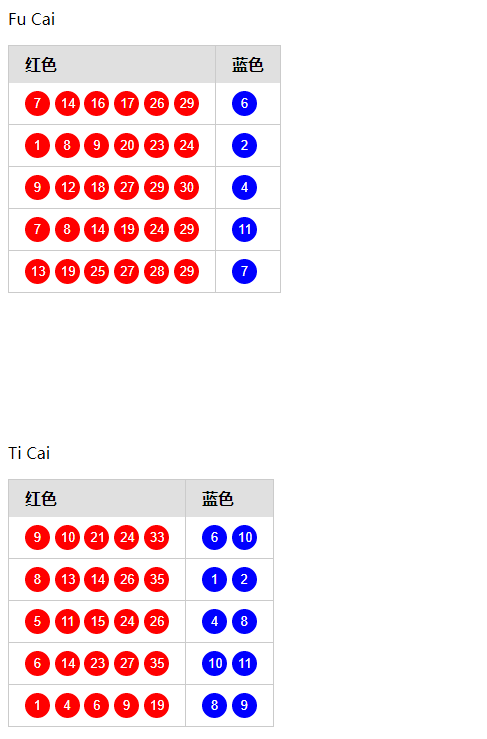
随机生成5组双色球组合,并利用flask启动网页可以进行浏览。
目录文件结构:
test_cp
|--07cp.py
|--templates
|  |--cp.html
|--start.sh
07cp.py
#!/bin/python
#-*- coding:utf8 -*-
'''
made  6 diff num,
read 01~33 ,6
blue 01~16 ,1

'''
import random
from flask import Flask,render_template
import datetime
app = Flask(__name__)

def nowTime():
    timeFormat = "%Y-%m-%d %H:%M:%S.%f"
    return datetime.datetime.now().strftime(timeFormat)


def in_num(nn, gg):
    if nn in gg:
        return False
    else:
        return True


def made_red():
    all_num = range(1,33)
    red = [0, 0, 0, 0, 0, 0]

    def one_num():
        num = 0
        while num == 0:
            num = random.randrange(1, 33+1, 1)
        return  num

    n = 0
    while red[5] == 0:
        n1 = one_num()
        while in_num(n1, red):
            red[n] = n1
            n=n+1

    red.sort()
    return red
def made_blue():
    return random.randrange(1, 16+1, 1)

# x = 0
# while x < 5:
#     read = made_read()
#     blue = made_blue()
#     print("read:", read, "\t\t\t blue:[", blue, "]")
#     x = x + 1
def tiCai():
    #1-35  , 1-12
    tc_red_num = [0, 0, 0, 0, 0,]
    tc_blue_num = [0,0]
    def tc_one_num():
        num = 0
        while num == 0:
            num = random.randrange(1, 35+1, 1)
        return  num

    def tc_two_num():
        num = 0
        while num == 0:
            num = random.randrange(1, 12+1, 1)
        return  num

    n = 0
    while tc_red_num[4] == 0:
        n1 = tc_one_num()
        while in_num(n1, tc_red_num):
            tc_red_num[n] = n1
            n = n + 1
    b = 0
    while tc_blue_num[1] == 0:
        b1 = tc_two_num()
        while in_num(b1,tc_blue_num):
            tc_blue_num[b] = b1
            b = b+1
    tc_red_num.sort()
    tc_blue_num.sort()
    return tc_red_num,tc_blue_num

@app.route('/')
def cp():
    print("\n",nowTime(), "\n", "===============")
    '''fu li cai piao'''
    red = [0]*5
    blue = [0]*5
    x=0
    while x<5:
        blue[x] = made_blue()
        red_g = made_red()
        red_g.append(blue[x])
        red[x] = red_g
        print(red[x])
        x=x+1
    '''dao zhe'''
    '''ti yu cai piao'''
    tc_red = [0]*5
    tc_blue = [0]*5
    tc_x = 0
    while tc_x < 5:
        tc_red[tc_x], tc_blue[tc_x] = tiCai()
        tc_red[tc_x].append(tc_blue[tc_x][0])
        tc_red[tc_x].append(tc_blue[tc_x][1])
        tc_x = tc_x + 1

    print(tc_red)
    # print(tc_blue)
    '''dao zhe '''
    return render_template('cp.html',
                           red=red,
                           # red0=red[0], blue0=blue[0],
                           # red0_0=red[0][0],
                           # red0_1=red[0][1],
                           # red0_2=red[0][2],
                           # red0_3=red[0][3],
                           # red0_4=red[0][4],
                           #
                           # red1_0=red[1][0],
                           # red1_1=red[1][1],
                           # red1_2=red[1][2],
                           # red1_3=red[1][3],
                           # red1_4=red[1][4],
                           tc_red=tc_red
                           # blue0=blue[0],
                           # blue1=blue[1],
                           # blue2=blue[2],
                           # blue3=blue[3],
                           # blue4=blue[4]
                           )
    #return "test"


if __name__ == '__main__':

    app.run("192.168.134.181",5000)
其中需要把app.run("172.16.9.171",5000)里的ip地址换成自己的。
templates–cp.html
<!DOCTYPE html>
<html lang="en">
<head>
    <title>?????...</title>
 <style type="text/css">
html {
    font-family: sans-serif;
    -ms-text-size-adjust: 100%;
    -webkit-text-size-adjust: 100%;
}

body {
    margin: 10px;
}
table {
    border-collapse: collapse;
    border-spacing: 0;
}

td,th {
    padding: 0;
}

.pure-table {
    border-collapse: collapse;
    border-spacing: 0;
    empty-cells: show;
    border: 1px solid #cbcbcb;
}

.pure-table caption {
    color: #000;
    font: italic 85%/1 arial,sans-serif;
    padding: 1em 0;
    text-align: center;
}

.pure-table td,.pure-table th {
    border-left: 1px solid #cbcbcb;
    border-width: 0 0 0 1px;
    font-size: inherit;
    margin: 0;
    overflow: visible;
    padding: .5em 1em;
}

.pure-table thead {
    background-color: #e0e0e0;
    color: #000;
    text-align: left;
    vertical-align: bottom;
}

.pure-table td {
    background-color: transparent;
}

.pure-table-bordered td {
    border-bottom: 1px solid #cbcbcb;
}
.r1{
    width:25px;
    height:25px;
    background-color:red;
    border-radius:50%;
    border:none;
    color:white;
    text-align:center;
}
.r2{
    width:25px;
    height:25px;
    background-color:blue;
    border-radius:50%;
    border:none;
    text-align:center;
    color:white;
}
</style>

</head>
<body>
<p>Fu Cai</p>
<table class="pure-table pure-table-bordered">
    <thead>
    <tr>
        <th>??</th>
        <th>??</th>
    </tr>
    </thead>

    {% for x in red %}

        <tr>
            <td>
                <input type="button" value="{{ x[0] }}" class="r1">
                <input type="button" value="{{ x[1] }}" class="r1">
                <input type="button" value="{{ x[2] }}" class="r1">
                <input type="button" value="{{ x[3] }}" class="r1">
                <input type="button" value="{{ x[4] }}" class="r1">
                <input type="button" value="{{ x[5] }}" class="r1">
            </td>
            <td>
                <input type="button" value="{{ x[6] }}" class="r2">

            </td>
        </tr>
    {% endfor %}
<!--    <tr>-->
<!--        <td  ><input type="button" value="{{ red0_0 }}" class="r1">-->
<!--            <input type="button" value="{{ red0_1 }}" class="r1">-->
<!--            <input type="button" value="{{ red0_2 }}" class="r1">-->
<!--            <input type="button" value="{{ red0_3 }}" class="r1">-->
<!--            <input type="button" value="{{ red0_4 }}" class="r1">-->
<!--        </td>-->
<!--        <td ><input type="button" value="{{ blue0 }}" class="r2"></td>-->
<!--    </tr>-->

<!--    <tr>-->
<!--        <td style=" color:red" >{{ red1 }}</td>-->
<!--        <td style=" color:blue" >{{ blue1 }}</td>-->
<!--    </tr>-->
<!--        <tr>-->
<!--        <td style=" color:red" >{{ red2 }}</td>-->
<!--        <td style=" color:blue" >{{ blue2 }}</td>-->
<!--    </tr>-->
<!--        <tr>-->
<!--        <td style=" color:red" >{{ red3 }}</td>-->
<!--        <td style=" color:blue" >{{ blue3 }}</td>-->
<!--    </tr>-->
<!--        <tr>-->
<!--        <td style=" color:red" >{{ red4 }}</td>-->
<!--        <td style=" color:blue" >{{ blue4 }}</td>-->

</table>

<PRE>


</PRE>

<p>
Ti Cai
</p>

<table class="pure-table pure-table-bordered">
    <thead>
    <tr>
        <th>??</th>
        <th>??</th>
    </tr>
    </thead>

    {% for x in tc_red %}

        <tr>
            <td>
                <input type="button" value="{{ x[0] }}" class="r1">
                <input type="button" value="{{ x[1] }}" class="r1">
                <input type="button" value="{{ x[2] }}" class="r1">
                <input type="button" value="{{ x[3] }}" class="r1">
                <input type="button" value="{{ x[4] }}" class="r1">
<!--                <input type="button" value="{{ x[5] }}" class="r1">-->
            </td>
            <td>
                <input type="button" value="{{ x[5] }}" class="r2">
                <input type="button" value="{{ x[6] }}" class="r2">

            </td>
        </tr>
    {% endfor %}

</table>
</body>
</html>
start.sh
#!/bin/bash
ps -ef|grep 07cp.py|grep -v grep|awk '{print "kill -9 " $2}'|sh
nohup python 07cp.py  &
放好对应文件运行start.sh可以直接进行网页浏览。flask端口号5000